UIResponder & UIEvent & UITouch 본문
안녕하세요, iOS 개발자 SJRespect 입니다.
일반적인 웹 프론트엔드와 비교했을 때, 모바일 환경에서의 매력 중 하나는 다양한 센서와 터치 기반 이벤트의 존재입니다. 오늘은 일반적으로 iOS에서 터치 이벤트를 처리할 때 사용하는 UIResponder, UIEvent , UITouch 가 UIKit에서 내부적으로 어떻게 동작하는지에 대해 확실히 알아보고 싶어 글을 작성해보려고 합니다.
시작 해 보겠습니다 !
우선 어플리케이션을 실행 할 때, UIKit에서는 Appdelegate에 @main 에서 UIApplicationMain 을 동작시킵니다. 이 때, 2개의 쓰레드 main run loop와 main event loop 를 통해 입력 이벤트를 대기하고 처리합니다.
UIKit에서는 UIView와 ViewController 같은 여러 클래스에서 UIResponder를 상속받고있는데요, 해당 슈퍼클래스의 메소드를 재정의하여 터치이벤트를 일반적으로 처리할 수 있었습니다.
입력 이벤트가 어떻게 처리되는지 확인하기 위해 임의의 ViewController의 subview로 UIView를 생성하였습니다.
첫번 째 상황은 UIView에서 터치 이벤트 메소드를 재정의하고, UITouch와 UIEvent의 로그를 확인해보았습니다.
class FirstView: UIView {

    override func touchesBegan(_ touches: Set<UITouch>, with event: UIEvent?) {
        os_log("firstView ToudchBegan!!! touches: \(touches) , event: \(event)")
    }

    override func touchesMoved(_ touches: Set<UITouch>, with event: UIEvent?) {
        os_log("firstView ToudchMoved!!! touches: \(touches) , event: \(event)")
    }


    override func touchesEnded(_ touches: Set<UITouch>, with event: UIEvent?) {
        os_log("firstView ToudchEnded!!! touches: \(touches) , event: \(event)")
    }

    override func touchesCancelled(_ touches: Set<UITouch>, with event: UIEvent?) {
        os_log("firstView ToudchCancelled!!! touches: \(touches) , event: \(event)")
    }

    override func hitTest(_ point: CGPoint, with event: UIEvent?) -> UIView? {
        print("firstView hitTest!!! point: \(point) , event: \(event)")
        return super.hitTest(point, with: event)
    }

}
/*
RESULT
===============================
firstView ToudchBegan!!!
touches:
[<UITouch: 0x14a298000>
type: Direct
phase: Began
tap count: 4
force: 0.000
window: <UIWindow: 0x103b9ee40; frame = (0 0; 375 812); gestureRecognizers = <NSArray: 0x3013a6f40>; layer = <UIWindowLayer: 0x301d9ec70>>
responder: <responderTest.FirstView: 0x103ba2100; frame = (76 122; 240 128); autoresize = RM+BM; backgroundColor = <UIDynamicCatalogSystemColor: 0x3006d3b00; name = systemGreenColor>; layer = <CALayer: 0x3013b3fe0>>
location in window: {255, 157.33332824707031}
previous location in window: {255, 157.33332824707031}
location in view: {179, 35.333328247070312}
previous location in view: {179, 35.333328247070312}]

event: <UITouchesEvent: 0x302a88000> timestamp: 241006 touches: {(
    <UITouch: 0x14a298000> type: Direct phase: Began tap count: 4 force: 0.000 window: <UIWindow: 0x103b9ee40; frame = (0 0; 375 812); gestureRecognizers = <NSArray: 0x3013a6f40>; layer = <UIWindowLayer: 0x301d9ec70>> responder: <responderTest.FirstView: 0x103ba2100; frame = (76 122; 240 128); autoresize = RM+BM; backgroundColor = <UIDynamicCatalogSystemColor: 0x3006d3b00; name = systemGreenColor>; layer = <CALayer: 0x3013b3fe0>> location in window: {255, 157.33332824707031} previous location in window: {255, 157.33332824707031} location in view: {179, 35.333328247070312} previous location in view: {179, 35.333328247070312}
)}


firstView ToudchEnded!!!

touches:
[<UITouch: 0x14a298000>
type: Direct
phase: Ended
tap count: 4
force: 0.000
window: <UIWindow: 0x103b9ee40; frame = (0 0; 375 812); gestureRecognizers = <NSArray: 0x3013a6f40>; layer = <UIWindowLayer: 0x301d9ec70>>
responder: <responderTest.FirstView: 0x103ba2100; frame = (76 122; 240 128); autoresize = RM+BM; backgroundColor = <UIDynamicCatalogSystemColor: 0x3006d3b00; name = systemGreenColor>; layer = <CALayer: 0x3013b3fe0>>
location in window: {255, 157.33332824707031}
previous location in window: {255, 157.33332824707031}
location in view: {179, 35.333328247070312}
previous location in view: {179, 35.333328247070312}]

event:
<UITouch: 0x14a298000> type: Direct phase: Ended tap count: 4 force: 0.000 window: <UIWindow: 0x103b9ee40; frame = (0 0; 375 812); gestureRecognizers = <NSArray: 0x3013a6f40>; layer = <UIWindowLayer: 0x301d9ec70>> responder: <responderTest.FirstView: 0x103ba2100; frame = (76 122; 240 128); autoresize = RM+BM; backgroundColor = <UIDynamicCatalogSystemColor: 0x3006d3b00; name = systemGreenColor>; layer = <CALayer: 0x3013b3fe0>> location in window: {255, 157.33332824707031} previous location in window: {255, 157.33332824707031} location in view: {179, 35.333328247070312} previous location in view: {179, 35.333328247070312}
*/
UITouch
- 터치가 발생한 View, Window내 에서의 터치의 위치 (window, view)
- 터치의 힘(3D Touch 또는 Apple Pencil을 지원하는 기기에서) (force)
- 발생 시점의 타임스탬프 (timestamp)
- 탭한 횟수 (tap count)
- 터치가 시작되었는지, 이동했는지, 끝났는지 여부 (phase)
UITouch에서는 이러한 정보를 얻을 수 있었습니다. 또, 공식 dcos에서는 아래 처럼 설명합니다.
터치 객체는 멀티 터치 시퀀스 전체에 걸쳐 지속됩니다.
터치 객체는 Set 형태로 저장하고, View에 대한 touch가 아닌 다양한 View에 대한 touch가 하나의 UIEvent 객체가 될 수도 있었습니다.
여기서 UITouch와 UIEvent는 누가 생성하고 UIResponder의 메소드들은 누가 호출하는지 가 궁금했습니다.
누가 UITouch를 생성하나요?
UITouch 객체는 iOS 시스템이 사용자 인터페이스와 상호작용할 때, 즉 사용자가 화면을 터치하면 생성됩니다. 개발자는 이 객체를 명시적으로 만들 필요가 없으며, 시스템이 터치 이벤트를 감지하고 자동으로 UITouch 객체를 생성합니다.
UIEvent
UIEvent는 여러 UITouch 객체들을 하나로 묶어 관리하는 객체입니다. 즉, 하나 이상의 UITouch 객체를 캡슐화하여 해당 이벤트에 대한 전반적인 정보를 제공하는 역할을 합니다. 위의 예제에서 UIEvent는 터치 이벤트만 확인했지만, UIEvent.EventType 을통해 키보드 입력, 모션 이벤트, 리모트 컨트롤, Press, Scroll 이벤트 등 다양한 유형의 Event를 처리할 수 있었습니다.
누가 UIEvent를 생성하나요?
UIEvent 또한 iOS 시스템이 관리하며, 사용자가 터치를 하거나 다른 이벤트를 발생시키면 시스템이 이를 감지하고 자동으로 UIEvent 객체를 생성합니다. (어떤 UITouch 객체인지 같은 주소로 저장하고있었습니다.! UITouch가 멀티 터치 시퀀스 전체에 걸쳐 지속된다고 하는데, 이 터치이벤트를 매핑 시켜서 저장한다고 생각되네요.)
UITouch와 UIEvent에 프로퍼티와 메서드 들이 정말 다양하게 있었습니다. 어떤 뷰에서 발생했는지 필터링도 할 수 있고, 터치에 대한 영역설정이나, 트랙패드, 팬슬인지도 구분할 수 있었습니다. 메소드 내에서 적절한 처리를 할 수 있겠네요
UIResponder (이벤트 처리 흐름)
터치 이벤트가 감지되면, iOS는 UITouch 객체들을 포함한 UIEvent 객체를 생성하는 것 까지 확인하였습니다. 그러면 어떻게 Event Loop 어떻게 Responder에게 해당 UIEvent를 전달할 수 있을지 궁금했습니다.
import UIKit

import os.log
class ViewController: UIViewController {
    override func touchesBegan(_ touches: Set<UITouch>, with event: UIEvent?) {
        os_log("ViewController ToudchBegan!!! touches: \(touches) , event: \(event)")
    }

    override func touchesMoved(_ touches: Set<UITouch>, with event: UIEvent?) {
        os_log("ViewController ToudchMoved!!! touches: \(touches) , event: \(event)")
    }


    override func touchesEnded(_ touches: Set<UITouch>, with event: UIEvent?) {
        os_log("ViewController ToudchEnded!!! touches: \(touches) , event: \(event)")
    }

    override func touchesCancelled(_ touches: Set<UITouch>, with event: UIEvent?) {
        os_log("ViewController ToudchCancelled!!! touches: \(touches) , event: \(event)")
    }
}
뷰에서 처리했던 코드를 똑같이 ViewController에서 동작시켜 보았습니다. 여전히 View의 계층은 ViewController의 subView로 FirstView가 존재합니다. 그리고 ViewController와 FirstView 모두 터치 메소드를 정의하였습니다.
결과는 여전히 UIView에 있는 touches 메서드들이 동작합니다.
여기서 UIKit은 event를 처리하는 큐에서 이벤트를 실행시키면 UIResponder를 상속받고있는 적절한 view를 자동으로 찾고, Responder의 메서드를 호출시키는 것을 확인할 수 있었습니다. 어떻게 적절한 view를 찾을까요 ?
UIKit은 적절한 View를 찾기 위해서 뷰 계층을 탐색하는, hitTest를 통해 탐색합니다. 히트 테스트는 깊이 우선 역방향 DFS 알고리즘을 사용합니다. 루트 노드를 방문한 다음 더 높은 인덱스에서 더 낮은 인덱스로 하위 트리를 탐색합니다.
hitTest를 통해 터치가 어떤 뷰 bounds 내에 발생했는지 확인하고, 뷰 탐색에 성공 했다면, 이 Responder가 이벤트를 처리할 수 있는지 확인하고 이벤트를 처리합니다. 만약 Responder가 이벤트를 처리할 수 없다면 다음 Responder에게 전송하게 됩니다.
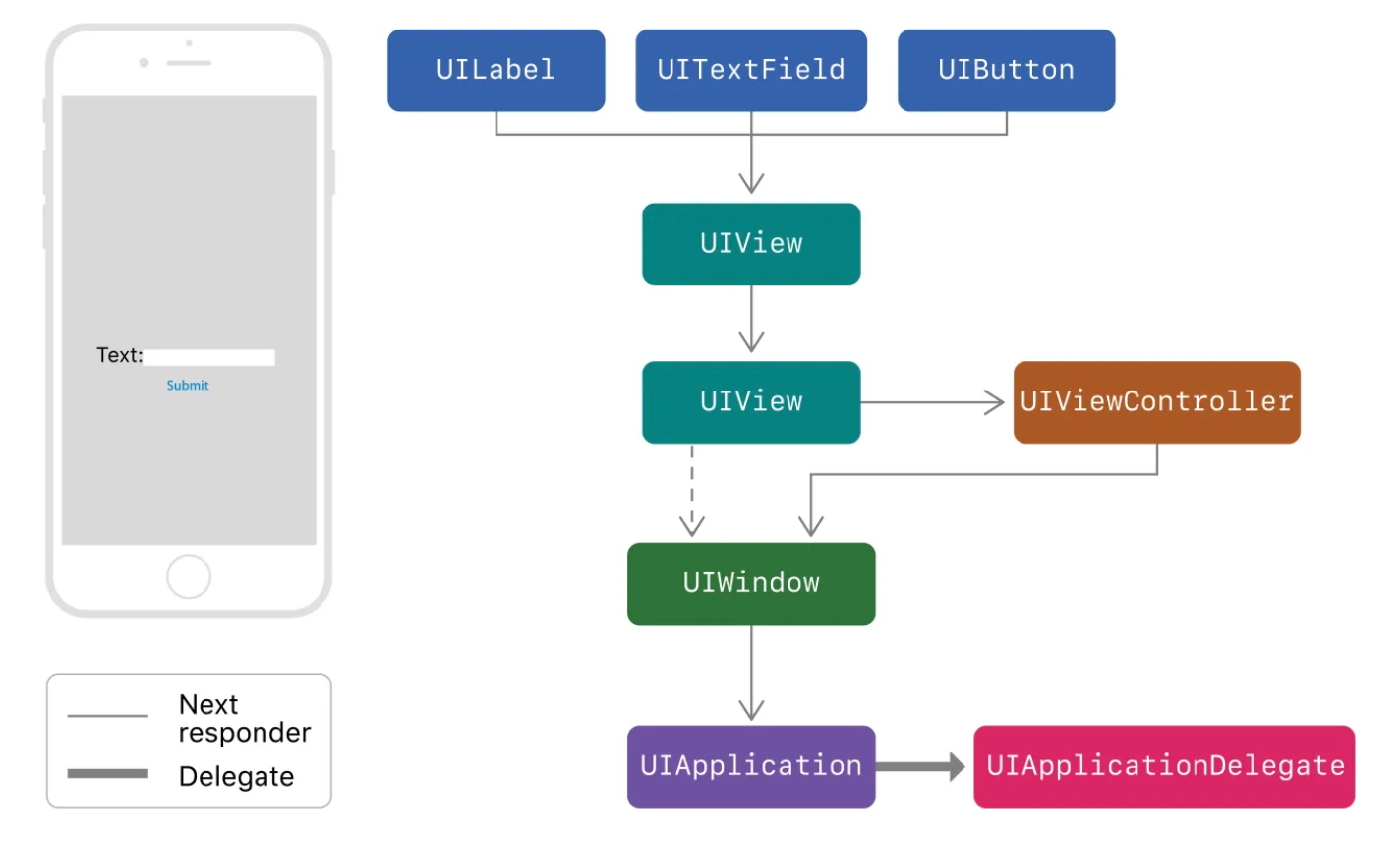
이렇게 이벤트를 처리하는 Responder의 순서를 Responder Chain 이라고 하네요,
'iOS Technologies' 카테고리의 다른 글
| iOS App SandBox (0) | 2025.11.08 |
|---|---|
| Workspace에서 Embed 전략 (0) | 2025.10.20 |
| xcodebuild로 프로젝트 빌드 시간 측정하는 방법 (0) | 2025.10.17 |
| [Widget Extension #1] 최신 데이터 갱신 (3) | 2025.08.13 |
| App Extension #1 (4) | 2025.06.05 |

